Why I Standardize Every Node.js Project on UTC Time
Infrastructure is volatile. Servers move, cloud providers change, and containers run anywhere. Enforce UTC before writing a single line of code.

When you start a new backend project, timezones rarely make it to your initial architecture checklist. You write code, test it locally, and deploy it to a server. If the server is in the same country as you, everything looks normal. The logs match your wall clock, database timestamps make sense, and your scheduled tasks run exactly when you expect them to.
This is a dangerous trap. It is a state of passive agreement between your application code and the default configuration of the host operating system.
In modern cloud development, that agreement is short-lived. The moment you containerize your application, migrate to a serverless platform, or shift your hosting region, your implicit timezone dependencies will break.
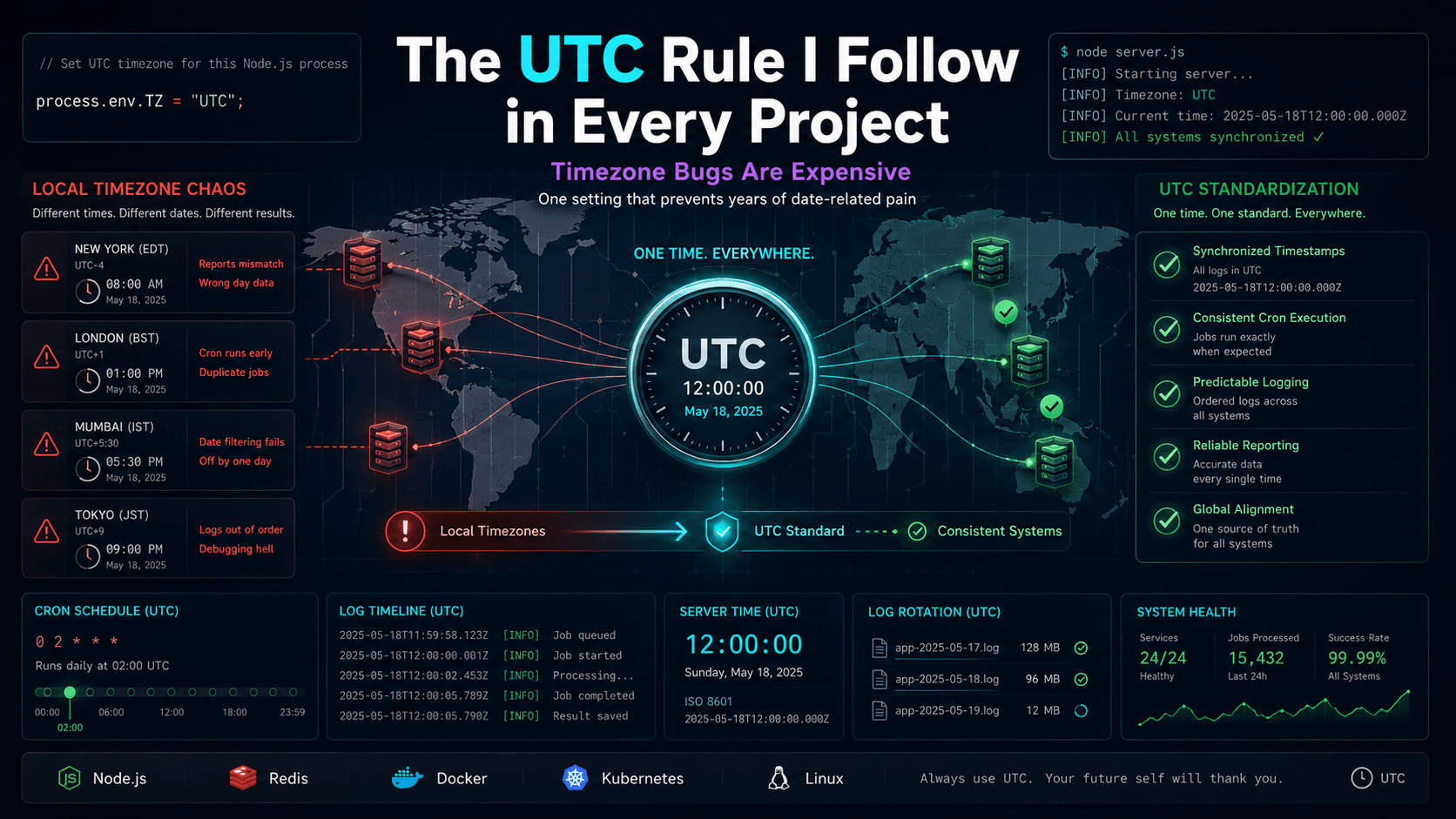
I realized infrastructure can move between regions, containers can run anywhere, and relying on local server time creates unnecessary operational risk. Because of this, I adopted a strict rule for every Node.js project: standardize everything on UTC before writing a single line of business logic.
Time is not a geographical setting for your backend; it must be a global constant.
If this code runs on the Mumbai server,
This clean boundary—UTC on the server, local timezone on the client—removes timezone logic entirely from your backend database queries and scheduler.
Why I stopped trusting server time
Initially, I did not think much about server timezones. We hosted our application on a server located in a single region. The database stored timestamps in local time, and we used standard cron libraries to run daily summaries at midnight relative to that local clock. It worked fine—until we started planning for scale and infrastructure portability. We realized that if our hosting setup changed, or if we needed to deploy replica nodes or run containers across multiple cloud zones to handle traffic, local timezone assumptions would immediately fall apart. If a task scheduler container runs in one region and the database runs in another, they will disagree on when "midnight" actually occurs. Depending on local server time is an unnecessary operational risk.Infrastructure changes more than you think
In a containerized, cloud-native environment, your infrastructure is volatile.- A container can spin up on a host machine in Mumbai, Singapore, or Oregon.
- Your managed database might perform an automatic failover to a replica in a different physical region.
- You might split your monolith into worker processes running on different cluster nodes, each configured with different system defaults.
new Date()), the behavior of your business logic becomes dependent on physical geography.
Servers can move. Time should not.
The Mumbai-to-Singapore thought experiment
To see how quickly this goes wrong, imagine your API is running on a server in Mumbai (ap-south-1, UTC+5:30) and your database is in Singapore (ap-southeast-1, UTC+8:00).
If you want to run a task at midnight local time to find all transactions created "today":
TypeScript
ts
// Runs at midnight local server timeconst startOfToday = new Date();startOfToday.setHours(0, 0, 0, 0);const transactions = await db.collection("transactions").find({createdAt: { $gte: startOfToday }}).toArray();
startOfToday is calculated using IST. If the same container is rescheduled to a Singapore node due to a server failure, startOfToday is suddenly calculated using SGT.
Because SGT is 2.5 hours ahead of IST, your query boundary shifts. The transactions fetched by the query will change depending entirely on which server node executed the request.
Why local server time is dangerous
Operating without a timezone standard introduces subtle failure modes across your entire system:- Unpredictable Cron Schedules: If a cron library schedules a job to run at
0 0 * * *(midnight), it executes according to the host system's timezone. If your container restarts on a server in a different region, the cron offset shifts. - Conflicting Date Filters: Database queries that filter by dates using relative boundaries (like "today" or "yesterday") will yield different results depending on the server's local offset.
- Mismatched Distributed Logs: Debugging an issue across an API server, a Redis queue, and a database becomes a mathematical chore if their logs use different regional timestamps.
- Data Inconsistency During Migrations: If you back up a database that stores raw local timestamps and restore it to a server in a different zone, your historical data silently shifts.
The UTC rule
Enforcing UTC means making your entire stack timezone-agnostic. Whether a process runs on a local laptop in Delhi, a container in Singapore, or a backup server in Frankfurt, it must output, process, and store time in Coordinated Universal Time. By standardizing on UTC:- Schedules are predictable: A cron scheduled for 2:30 AM UTC always runs at 2:30 AM UTC, regardless of where the worker process is hosted.
- Logs are consistent: Timestamps in application logs, database logs, and system metrics align perfectly.
- Reporting is stable: Daily boundaries are absolute and do not wobble during server migrations.
- Debugging is simplified: You no longer need to perform time zone conversions while tracing an issue across services.
The code I add to every project
To guarantee that your Node.js application runs in UTC regardless of the host environment, you must set the timezone environment variableprocess.env.TZ = "UTC" at the absolute entry point of your application.
This setting must occur before any database client, date library, or server framework is imported, as many libraries read process.env.TZ during their initialization phase.
Here is the setup I use in every project's entry file (index.ts / app.ts):
TypeScript
ts
// Enforce UTC timezone at the absolute entry pointprocess.env.TZ = "UTC";import express from "express";import cron from "node-cron";import mongoose from "mongoose";const app = express();// Simple logging middleware using UTC ISO 8601 stringsapp.use((req, res, next) => {const timestamp = new Date().toISOString(); // Always outputs in UTCconsole.log(`[${timestamp}] ${req.method} ${req.url}`);next();});// A cron job that runs daily at midnight UTCcron.schedule("0 0 * * *", () => {console.log(`[${new Date().toISOString()}] Running daily summary...`);generateDailyReport();});async function generateDailyReport() {const now = new Date();// Calculate yesterday's UTC boundariesconst startOfYesterday = new Date(Date.UTC(now.getUTCFullYear(), now.getUTCMonth(), now.getUTCDate() - 1, 0, 0, 0, 0));const endOfYesterday = new Date(Date.UTC(now.getUTCFullYear(), now.getUTCMonth(), now.getUTCDate() - 1, 23, 59, 59, 999));console.log(`Aggregating records from ${startOfYesterday.toISOString()} to ${endOfYesterday.toISOString()}`);// MongoDB query using UTC ISO boundariesconst transactions = await mongoose.connection.db.collection("transactions").find({createdAt: {$gte: startOfYesterday,$lte: endOfYesterday}}).toArray();console.log(`Processed ${transactions.length} transactions.`);}
Formatting Frontend Display
When you standardize your backend and database on UTC, you must handle local timezone presentation on the client side. The server serves UTC timestamps, and the client browser translates them to the user's local timezone.TypeScript
ts
// Client-side JavaScriptconst utcDateStr = "2026-05-31T09:30:00Z"; // From server APIconst localDate = new Date(utcDateStr);console.log(localDate.toLocaleString());// Automatically displays in the user's browser timezone
Final engineering lesson
Infrastructure shifts are a natural part of growing a software product. You will change host providers, add regions, scale worker clusters, and update database architectures. If your code contains implicit assumptions about the timezone of the hardware it runs on, every infrastructure change will feel like a high-risk operation. Standardizing on UTC from day one makes your application independent of server geography. It is a tiny, zero-cost configuration that eliminates an entire class of production bugs before you write a single line of code.FAQ
Common questions about UTC and Node.js backend dates.
Why use UTC in Node.js?
Standardizing on UTC ensures that date calculations, cron schedules, and log timestamps remain identical regardless of the physical location or default timezone configuration of your server hosting infrastructure.
Does UTC affect users?
Only if you display raw UTC strings directly to users. The recommended approach is to process and store all time as UTC on the backend, and use client-side JavaScript (
toLocaleString()) to format dates to the user's browser timezone.What happens if a server changes region?
If your application uses local server time, changing the hosting region will shift your cron offsets, date boundaries, and query results. If standardizing on UTC, changing regions has zero impact on application behavior.
Should cron jobs use UTC?
Yes. Scheduling crons in UTC ensures they run at absolute points in time. If you need a task to align with a local time (e.g., 9:00 AM IST), calculate the UTC equivalent (3:30 AM UTC) and schedule it using that offset.
Does UTC solve timezone bugs?
It eliminates bugs caused by server-side timezone mismatches and regional migrations. It does not automatically solve client-side input parsing issues, but it provides a clean, single standard for all backend computations.
What timezone should databases use?
Databases should store dates in UTC. In SQL databases, use
TIMESTAMP WITH TIME ZONE or similar types that store absolute times. In NoSQL databases like MongoDB, store dates as ISO 8601 strings ending in Z.Should workers also use UTC?
Yes. All processes in a distributed system (API servers, background workers, cron schedulers) must share the same UTC timezone configuration to ensure data consistency and log alignment.
Is UTC required for multi-region deployments?
Yes. Without UTC, nodes running in different regions will write mismatched logs and execute scheduled tasks at different intervals, leading to severe consistency and synchronization failures.