Separating Workers From My API Created a Deployment Problem
Separating background workers from the API server makes architecture cleaner, but it introduces process lifecycle issues you might not expect.

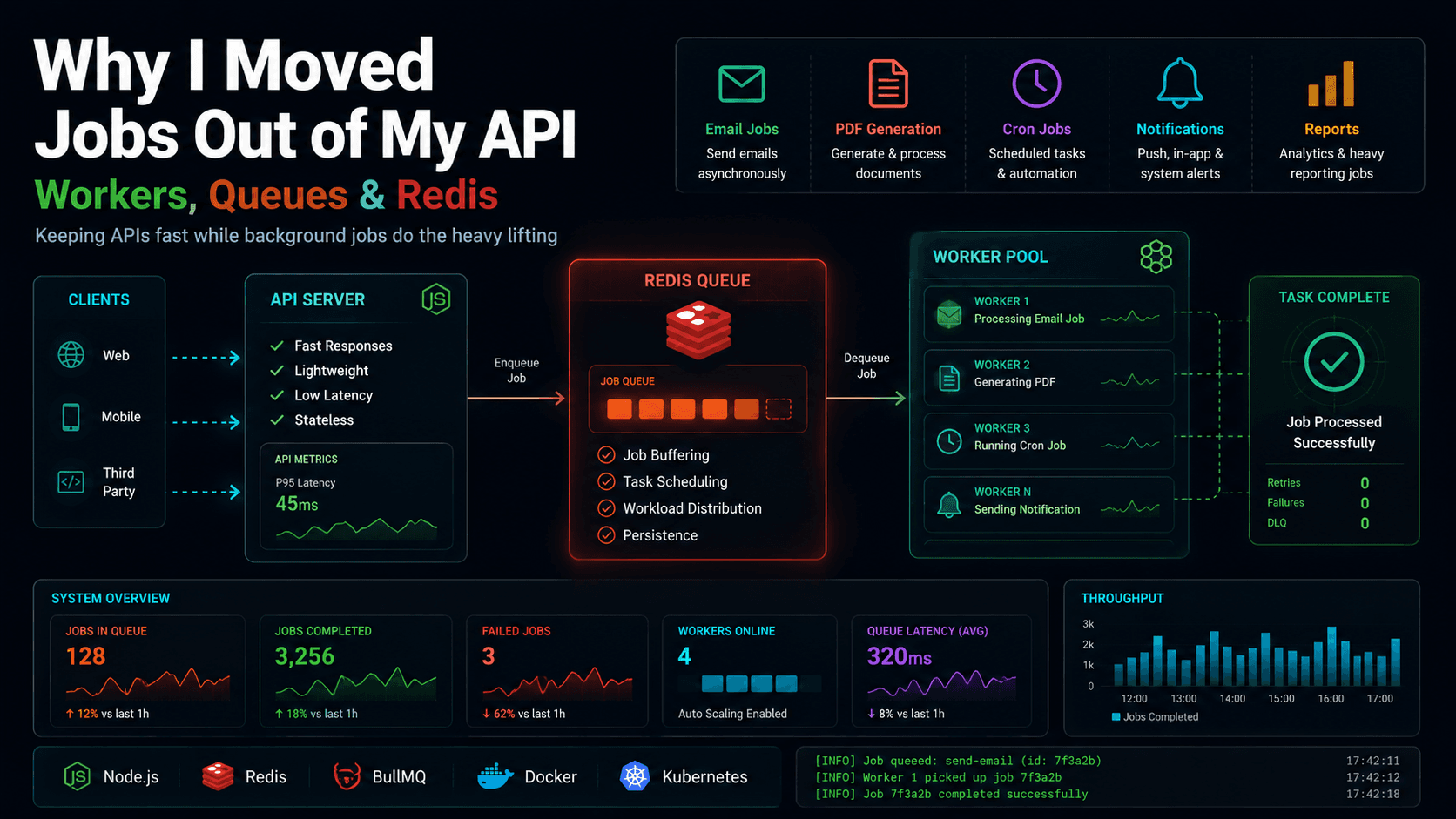
When your application starts growing, the advice you get from every senior engineer is identical: separate your concerns. Do not run heavy image processing, payment calculations, or batch email sends in your web server. Keep the API server lightweight, fast, and focused on receiving and responding to client requests. Move everything else to background workers.
So, I did. I split my monolithic Node.js process.
I set up an API service running Express, a separate Worker service using BullMQ, and a Redis instance sitting between them. The API received a request, pushed a job to Redis, and returned a
If the worker process receives a
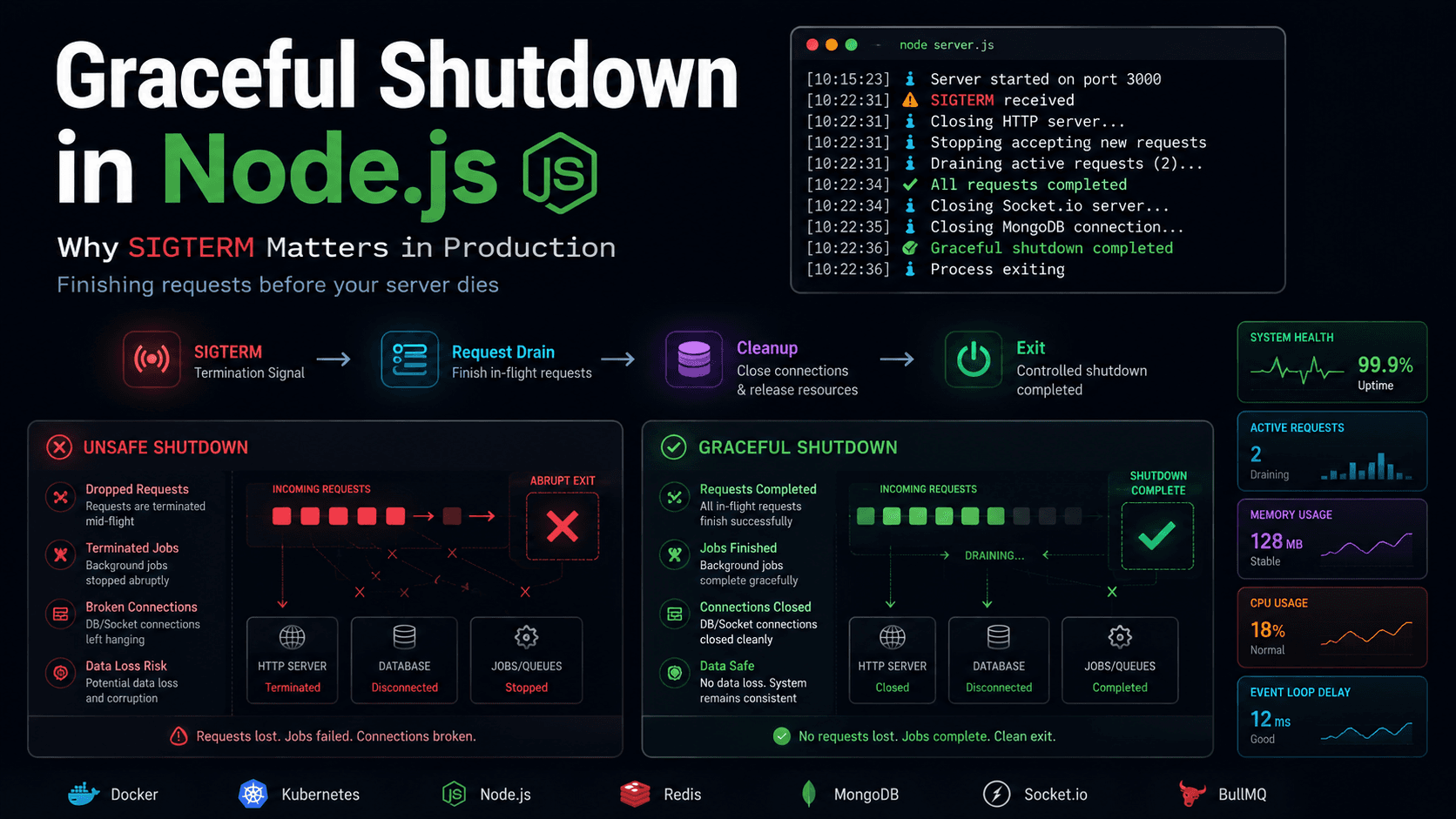
Here is the lifecycle of a graceful worker deployment:
During a deployment, the old worker receives
If you use PM2 to manage this worker process, make sure to configure
202 Accepted immediately. The Worker picked up the job and did the heavy lifting.
On paper, it looked like a major architectural win. The API response times dropped, database load leveled out, and the separation of services made the codebase clean and modular.
The architecture looked solid until we started thinking about deployments.
Why I separated workers from my API
Initially, deployments were simple because everything lived in one process. We ran a single command:pm2 reload api. If there were cron jobs scheduled using standard in-process libraries (like node-cron), they lived inside that same process. A restart meant the server briefly stopped, spun back up, and rescheduled the cron loops.
As traffic scaled, this single-process model began to break down.
If a user triggered a CSV export containing 50,000 database rows, the API process would start crunching the data. Node.js is single-threaded, and while it excels at asynchronous I/O, CPU-heavy tasks like serializing data or generating large files block the event loop.
During those exports, other users trying to access simple API endpoints began seeing latency spikes, timeouts, and gateway errors. The CPU chart showed a single core pinned at 100%, taking our web traffic down with it.
Separating the processes was the logical next step.
The architecture looked perfect
The new architecture decoupled compute resource usage completely:- API Process: Handles incoming HTTP requests, performs quick validations, pushes jobs to the queue, and returns JSON responses.
- Redis Queue: Acts as the message broker, storing job data and managing queue states (waiting, active, completed, failed).
- Worker Process: Connects to Redis, polls for new jobs, executes background tasks, and manages cron/repeatable schedules.
The deployment problem appeared
We shipped the new setup, and for the first few hours, it worked perfectly. But as we prepared to deploy our next round of updates, we had to look closely at the mechanics of the process restart. If a worker is terminated abruptly in the middle of executing a task, we run into the limits of standard process management. Unlike an API server where we can drain HTTP traffic at the load balancer, a background worker is pull-based—it pulls and executes jobs directly from Redis. We realized that our deployment pipeline—which worked fine for the single-process API—introduced a new challenge. During a deployment, the old worker process is terminated and the new one starts. If you reload the worker process while it is in the middle of executing a 30-second background job, what happens to that job?What happens to running jobs?
When a process manager restarts a worker, it sends a termination signal. If the worker does not explicitly catch this signal and handle it, the process terminates immediately. From the queue's perspective (e.g., in BullMQ), the worker simply stopped communicating. BullMQ maintains a lock on active jobs using Redis to prevent other workers from processing them simultaneously. If a worker terminates abruptly:- The active job is left half-finished.
- The lock in Redis remains active until its TTL (time-to-live) expires.
- Once the lock expires, the queue manager assumes the worker crashed and puts the job back in the
waitingorfailedstate. - When the new worker starts up, it picks up the half-finished job and starts executing it from the beginning.
What happens to cron schedules?
In a monolithic API, in-memory cron schedules run as long as the process is alive. If you deploy, you briefly interrupt the timer, but it reschedules on boot. With a split queue architecture, cron jobs are often registered as repeatable jobs in Redis. When the scheduled time arrives, Redis generates a job event. If your deployment timing coincides exactly with a cron schedule, and all workers are currently restarting, the job event is placed in the queue. However, if the old worker was in the middle of preparing the cron execution and got terminated, the job can become orphaned or delayed. If your workers are offline or restarting, you can miss the narrow execution window for time-sensitive crons, or worse, execute them multiple times if the scheduler state gets out of sync during the restart.The risk of duplicate execution
If a background job is not idempotent—meaning it cannot be run multiple times safely without changing the outcome—abrupt restarts can cause duplicate execution issues. A payment workflow makes the risk easy to visualize:TypeScript
ts
async function processSubscriptionPayment(job) {const { userId, amount } = job.data;// Step 1: Charge the card via payment gatewayawait paymentGateway.chargeCard(userId, amount);// Step 2: Update the databaseawait db.users.updateOne({ id: userId }, { $set: { status: "active" } });}
SIGKILL or unhandled SIGTERM right after Step 1 but before Step 2, the card is charged, but the database is never updated.
When the new worker process boots up and retries the job, it executes Step 1 again, potentially charging the customer twice.
The risk of missed execution
The opposite failure mode is missed execution. If your worker process crashes or is killed during a job, and you do not configure your queue to retry failed jobs automatically, that job is lost forever. The queue marks it asfailed because the worker disappeared, but no notification is sent, and the business logic is left incomplete.
Why Redis alone doesn't solve this
Redis is an incredibly fast, reliable data structure store, but it is not an application server. It cannot monitor the internal state of your Node.js event loop. It only knows if a lock is active, if a key has expired, or if a connection is open. Libraries like BullMQ write complex Lua scripts to handle queue state machines, but they rely on your application code to tell them when the process is shutting down. Redis cannot force your Node.js worker to cleanly stop accepting work; your application code must handle that.Graceful shutdown for workers
To prevent duplicate runs and aborted tasks, we must implement a graceful shutdown sequence for our workers. Instead of killing the process immediately, the deployment pipeline must signal the worker, giving it time to stop picking up new jobs, finish its active work, and then exit.Separating workers solves one problem but creates another: process lifecycle management.
File
text
Old Worker → Receives SIGTERM → Stops Pulling Jobs → Finishes Active Jobs → Exits Cleanly → New Worker Starts
SIGTERM. It tells the queue: "I am closing. Do not give me any more jobs." It then waits for the jobs it is currently running to finish before shutting down. Only then does the process exit.
The deployment workflow I use today
To implement this, we need to handle the worker shutdown flow in code. In BullMQ, this is accomplished by callingworker.close().
When you call worker.close(), the worker stops polling Redis for new jobs. The method returns a promise that resolves only when all active jobs currently being processed by that worker have completed.
Here is a production-ready example of wrapping a BullMQ worker with graceful shutdown handling:
TypeScript
ts
import { Worker } from "bullmq";import IORedis from "ioredis";import mongoose from "mongoose";const connection = new IORedis(process.env.REDIS_URL || "redis://127.0.0.1:6379");let isShuttingDown = false;// Create the workerconst emailWorker = new Worker("email-queue",async (job) => {console.log(`Processing job ${job.id}: Sending email to ${job.data.to}`);// Simulate email sending API callawait new Promise((resolve) => setTimeout(resolve, 5000));console.log(`Job ${job.id} completed.`);},{ connection });// Graceful shutdown logicasync function handleShutdown(signal: string) {if (isShuttingDown) return;isShuttingDown = true;console.log(`Received ${signal}. Graceful shutdown initiated.`);// Set a fail-safe timeout to force-kill the process if it hangsconst forceExitTimeout = setTimeout(() => {console.error("Worker shutdown timed out. Force exiting.");process.exit(1);}, 30000); // 30 seconds max execution timetry {// 1. Stop taking new work from the queue and wait for active jobs to finishconsole.log("Closing worker...");await emailWorker.close();console.log("Worker closed. No active jobs remaining.");// 2. Disconnect from database and cache layersif (mongoose.connection.readyState !== 0) {console.log("Closing database connection...");await mongoose.connection.close();console.log("Database connection closed.");}console.log("Disconnecting Redis...");await connection.quit();console.log("Redis disconnected.");clearTimeout(forceExitTimeout);console.log("Graceful shutdown completed successfully.");process.exit(0);} catch (error) {console.error("Error during graceful shutdown:", error);clearTimeout(forceExitTimeout);process.exit(1);}}// Listen for process signalsprocess.on("SIGTERM", () => handleShutdown("SIGTERM"));process.on("SIGINT", () => handleShutdown("SIGINT"));
kill_timeout in your ecosystem.config.js to match or exceed your worker's force exit timeout:
JavaScript
js
module.exports = {apps: [{name: "background-worker",script: "./dist/worker.js",kill_timeout: 35000 // Give the worker 35s to complete active work before force-killing}]};
Final architecture lesson
Dividing a large backend system into microservices or separate processes makes your scaling characteristics better, but it shifts the engineering complexity from code design to runtime operations. If you separate your workers from your API, you must treat your workers as independent, stateful processes with their own lifecycle. Neglecting to handle how they terminate can turn a clean architecture into a source of retries, race conditions, and difficult-to-debug operational issues. Before you split your next service, make sure you know exactly how it shuts down.FAQ
Common questions about queue workers and process reloads.
Why separate workers from API servers?
Separating workers prevents CPU-heavy, long-running tasks from blocking the single-threaded Node.js event loop on your API server. This keeps API response times fast and consistent even under heavy background workloads.
Can Redis prevent duplicate jobs?
Redis provides locking primitives, and queue managers like BullMQ use these to ensure a job is only run by one worker at a time. However, if a worker crashes or is killed mid-job, the lock will eventually expire, and the job will be retried, which can cause duplicate executions if the job is not idempotent.
What happens if a worker dies mid-job?
If a worker dies without handling signals, the active lock on the job remains in Redis until it times out. Once the lock expires, the queue manager moves the job back to the active queue to be picked up by another worker, resulting in a retry.
Can cron jobs be missed during deployment?
Yes, if your scheduler service is restarting or in a bad state when the cron schedule fires. Using Redis-backed schedulers like BullMQ’s repeatable jobs ensures schedules are persistent, but you still need worker processes online to consume them.
Should workers use graceful shutdown?
Yes, strongly. Workers should stop polling for new jobs immediately upon receiving a termination signal, complete the jobs they are already processing, and then disconnect from database pools before exiting.
Does BullMQ solve deployment issues automatically?
No. BullMQ provides the
.close() method to pause workers and wait for running jobs to finish, but you must wire this method up to your process signal listeners (SIGTERM and SIGINT) in your application code.How do production systems handle worker restarts?
Production environments use process managers (like PM2) or orchestrators (like Kubernetes) configured with rolling updates. They send a
SIGTERM signal, wait for a specified termination grace period (e.g., 30 seconds), and only send SIGKILL if the process fails to exit on its own.