Why I Added Graceful Shutdown to Every Node.js Project
Deployments are easy. Safe deployments are harder. A production lesson about SIGTERM, active requests, and allowing important work to finish.

This is a production lesson about something I ignored for a long time: how a Node.js process shuts down. It is a story about realizing that running a backend in production means caring as much about how a process dies as how it starts.
Initially, I did not think deeply about process lifecycle. I packaged my Node.js applications, deployed them using PM2, and managed updates with commands like
The change itself did not magically solve deployments. What it changed was how I thought about process lifecycle. Once I started thinking about shutdown behavior explicitly, adding graceful shutdown became an obvious next step.
To achieve this, the shutdown flow must execute the following sequence:
Starting in Node.js v18.2.0, you can also use
To make the transition smoother, we can broadcast a "disconnecting" message to clients, allowing the client-side code to gracefully handle the reconnection loop or show a user-friendly reconnecting UI.
During shutdown, we poll or check the
By increasing
npm run start, pm2 restart, or pm2 reload. Deployments worked. The pipeline went green, the CPU charts stayed stable, and the applications looked healthy.
But while deployments were technically succeeding, the process stopped, and I had no guarantees about how active requests, Socket.io connections, or scheduled work were being cleaned up.
The lesson was simple: deployments are easy; safe deployments are harder.
The deployment problem nobody notices
When you run a Node.js process locally, you start it, test it, and terminate it withCtrl+C. The process stops instantly, and you move on. In local development, there is no concurrent traffic, no long-lived database transactions, and no persistent WebSocket connections.
In production, your server is constantly busy. At any given millisecond:
- A user is uploading a large profile image.
- A database transaction is updating an account balance.
- A background worker is looping through a batch of webhooks.
- Active clients may be holding open WebSocket connections for real-time updates.
What happens during a restart
When you trigger a command likepm2 restart app or run a container deployment, the process manager sends a signal to your running application telling it to shut down.
Typically, this signal is SIGTERM (termination) or SIGINT (interrupt).
If your Node.js code has no event listener for these signals, the runtime handles them by exiting immediately with a default exit code. The process terminates, regardless of what the event loop is doing.
Here is the typical timeline of an unhandled process restart:
- You run
pm2 reload appor trigger a rolling deployment. - PM2 sends a
SIGINTorSIGTERMsignal to the active process. - The Node.js process immediately shuts down.
- Any client with an active HTTP request in progress receives a closed socket or a
502 Bad Gatewayfrom the load balancer. - Any in-flight requests or long-running operations may be interrupted, leading to failed user actions, incomplete processing, or difficult-to-reproduce errors.
- The new process starts and begins accepting fresh traffic.
Why I started caring about SIGTERM
The turning point was realizing that our backend was doing more than just responding to quick JSON API calls. As our application grew, we added persistent WebSocket connections via Socket.io, scheduled database cleanups, and background routines that ran on interval timers. Whenever we deployed a new build, we ranpm2 reload. PM2 would spin up a new process and eventually send a termination signal to the old one. If the old process was currently running a multi-second background database query, or if it was maintaining active WebSocket connections, those operations were abruptly halted.
We were treating process restarts as instant transitions, ignoring the fact that our processes were running active work that needed to be completed. We wanted operational confidence that a deployment wouldn't leave our database connections hanging or truncate half-processed data.
The small deployment change I made
Initially, we ran our applications using npm wrapper scripts inside PM2, starting them with commands likenpm run start or having PM2 point to a package script.
To improve our deployment reliability, we made a simple change. Instead of starting the application through npm scripts, we configured PM2 to run the compiled JavaScript file directly:
Terminal
bash
pm2 start dist/index.js --name "$PM2_APP_NAME"
Deployments are process lifecycle events
A mature production backend cannot treat shutdowns as exceptional events or abrupt failures. Process termination is a normal, expected phase of the application lifecycle. Whether you are using PM2, Docker, Kubernetes, or serverless runtimes, your processes will be started, stopped, restarted, and scaled up and down. If your application cannot clean up after itself and finish its active responsibilities, you are relying on luck to maintain data integrity. Running applications through npm wrappers can make signal handling and process lifecycle behavior harder to reason about because multiple processes are involved. I preferred starting the compiled Node.js application directly under PM2 so lifecycle behavior became easier to understand and control. With PM2 invoking our Node.js binary directly, signals likeSIGTERM and SIGINT could propagate directly to our application code, allowing us to implement proper graceful shutdown handlers.
What graceful shutdown actually means
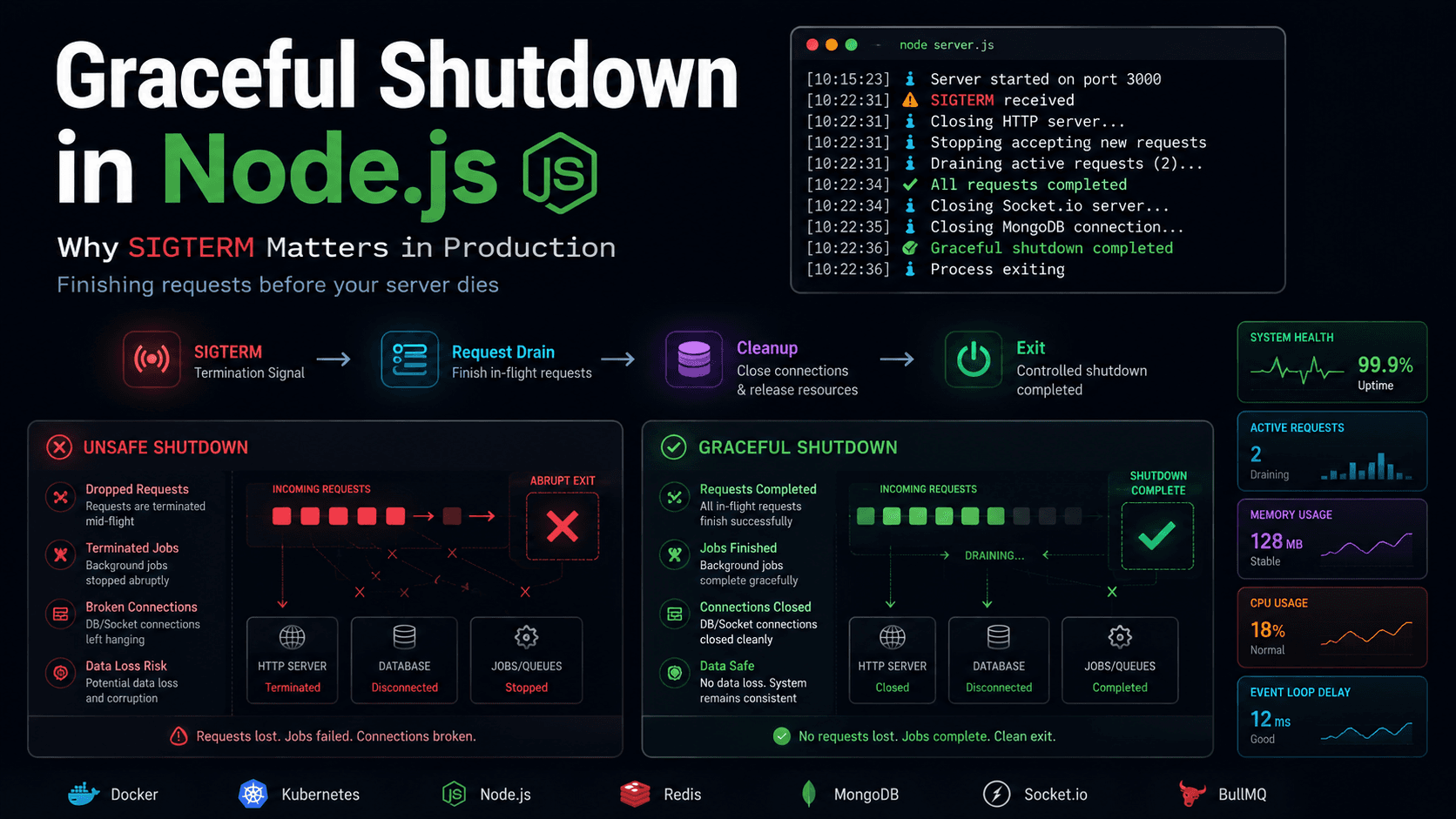
A graceful shutdown is the process of safely winding down an application before the process exits. The goal is to ensure that no active user requests are lost, database resources are released cleanly, and all background work completes cleanly.The goal is not keeping the process alive. The goal is allowing important work to finish before the process dies.
File
text
Active Traffic → SIGTERM Received → Stop Accepting New Requests → Finish Active Work → Close DB Sockets → Clean Exit
- Receive the shutdown signal: The application intercepts
SIGTERM(sent by Kubernetes, Docker, or PM2) orSIGINT(sent by a terminal user or PM2 reload). - Stop accepting new traffic: The HTTP and WebSocket servers stop listening for new incoming connections.
- Allow active work to complete: In-flight HTTP requests, active WebSocket tasks, and running background cron jobs are allowed to finish.
- Clean up resources: Close database pools, flush logs, and disconnect from message queues.
- Exit cleanly: Call
process.exit(0)to indicate to the operating system that the shutdown succeeded.
The shutdown flow I use today
To implement this reliably, we need to handle different types of active work differently. Let's look at the primary components we have to shut down in a typical Node.js production service.1. HTTP requests
When shutting down, we must stop accepting new HTTP requests immediately, but keep the server running long enough to finish responses for requests that are already in progress. In Node.js, callingserver.close() stops the HTTP server from accepting new TCP connections. Existing, active connections remain open until they are closed by the client or server.
TypeScript
ts
server.close((err) => {if (err) {console.error("Error closing HTTP server:", err);process.exit(1);}console.log("HTTP server closed.");});
server.closeIdleConnections() to terminate any HTTP keep-alive connections that are currently idle, preventing them from keeping the process alive unnecessarily.
2. Socket connections
If your application uses WebSockets (e.g., via Socket.io), closing the HTTP server is not enough. Active Socket.io connections will keep the server socket open, and the process will hang until the clients disconnect on their own. We must explicitly tell Socket.io to close. Theio.close() method disconnects all active clients and closes the underlying engine.
TypeScript
ts
io.close(() => {console.log("Socket.io server closed.");});
3. Cron jobs and background work
If your process runs cron jobs or queue consumers, you cannot kill the process while a job is running. To handle this:- Stop the scheduler so no new jobs start.
- Track active jobs using a simple counter.
- Wait for the active jobs counter to reach zero before continuing the shutdown sequence.
TypeScript
ts
let activeJobs = 0;function trackJob(promise: Promise<void>) {activeJobs++;return promise.finally(() => {activeJobs--;});}
activeJobs count, waiting for it to clear before calling the final database disconnects.
PM2 and deployment improvements
PM2 is excellent for process management, but its default reload settings are often too aggressive. When you callpm2 reload, PM2 starts a new instance of your application, waits for it to become ready, and then sends SIGINT to the old instance. By default, PM2 only waits 1600ms (the kill_timeout) before sending SIGKILL to force-terminate the old process.
If your application takes 5 seconds to complete active HTTP requests and close database pools, PM2 will kill it before it can finish.
To fix this, add kill_timeout to your PM2 ecosystem file (ecosystem.config.js):
JavaScript
js
module.exports = {apps: [{name: "api-service",script: "./dist/index.js",kill_timeout: 10000, // Wait 10 seconds before force-killinglisten_timeout: 5000,wait_ready: true}]};
kill_timeout to 10000 (10 seconds), we give our Node.js application enough time to drain active requests, finish cron jobs, and close connection pools cleanly.
The code
Here is a complete, production-ready TypeScript implementation that brings all these concepts together. It handles Express, Socket.io, Mongoose (MongoDB), active requests tracking, and a fail-safe timeout to prevent the process from hanging indefinitely.TypeScript
ts
import http from "node:http";import mongoose from "mongoose";import { Server as SocketServer } from "socket.io";import express from "express";const app = express();const server = http.createServer(app);const io = new SocketServer(server);// Keep track of active requests and background jobslet activeConnections = 0;let isShuttingDown = false;// Middleware to track active HTTP requests and block traffic during shutdownapp.use((req, res, next) => {if (isShuttingDown) {res.setHeader("Connection", "close");res.status(503).send("Server is shutting down.");return;}activeConnections++;res.on("finish", () => {activeConnections--;});next();});app.get("/api/data", async (req, res) => {// Simulate a database readawait new Promise((resolve) => setTimeout(resolve, 500));res.json({ status: "ok" });});// Graceful shutdown orchestratorasync function gracefulShutdown(signal: string) {if (isShuttingDown) {console.log("Shutdown already in progress.");return;}isShuttingDown = true;console.log(`Received ${signal}. Starting graceful shutdown...`);// 1. Force exit timeout (fail-safe)const forceExitTimeout = setTimeout(() => {console.error("Graceful shutdown timed out. Force exiting.");process.exit(1);}, 15000); // 15 seconds limittry {// 2. Close Socket.io serverif (io) {console.log("Closing Socket.io server...");io.close();}// 3. Close HTTP serverconsole.log("Closing HTTP server...");await new Promise<void>((resolve, reject) => {server.close((err) => {if (err) return reject(err);resolve();});// Forcefully close idle connections (Node v18.2.0+)if (typeof server.closeIdleConnections === "function") {server.closeIdleConnections();}});console.log("HTTP server stopped accepting connections.");// 4. Wait for active connections / background jobs to drainwhile (activeConnections > 0) {console.log(`Waiting for ${activeConnections} active requests to finish...`);await new Promise((resolve) => setTimeout(resolve, 500));}console.log("All active requests completed.");// 5. Close database connectionsif (mongoose.connection.readyState !== 0) {console.log("Closing database connection...");await mongoose.connection.close();console.log("Database connection closed.");}clearTimeout(forceExitTimeout);console.log("Graceful shutdown completed successfully.");process.exit(0);} catch (error) {console.error("Error during graceful shutdown:", error);clearTimeout(forceExitTimeout);process.exit(1);}}// Intercept OS termination signalsprocess.on("SIGTERM", () => gracefulShutdown("SIGTERM"));process.on("SIGINT", () => gracefulShutdown("SIGINT"));// Start serverconst PORT = process.env.PORT || 3000;server.listen(PORT, () => {console.log(`Server listening on port ${PORT}`);// If running under PM2 with wait_ready, signal readinessif (typeof process.send === "function") {process.send("ready");}});
Final engineering lesson
When we build software, we spend most of our time optimizing for the active state—making queries faster, keeping memory footprints low, and ensuring high throughput. But the stability of a production environment depends heavily on how the system behaves under stress and change. I used to think deployments were mostly about getting new code online. Now I think they are equally about letting old code leave cleanly. A process that starts correctly is useful. A process that stops correctly is production-ready. Writing Node.js services that respect process lifecycle signals makes deployments boring, predictable, and robust. Before you spend days optimizing database indexes or refactoring API handlers, verify how your application handles termination. Safely letting active requests finish is one of the cheapest reliability wins you can buy.FAQ
Common questions about Node.js lifecycle and graceful shutdown.
What is SIGTERM?
SIGTERM is the standard termination signal sent by operating systems, container engines (like Docker), and orchestrators (like Kubernetes) to request that a process stop running. Unlike SIGKILL, SIGTERM can be caught and handled by the application, allowing it to perform cleanup tasks.What is the difference between SIGTERM and SIGINT?
SIGTERM (Signal Terminate) is sent by system tools to cleanly stop a process. SIGINT (Signal Interrupt) is typically sent when a user presses Ctrl+C in a terminal window. Both signals request process termination, and a production application should listen to and handle both.Does PM2 handle graceful shutdown automatically?
No. PM2 will send
SIGINT (or SIGTERM if configured) to your process during a restart or reload, but your application must contain the code to catch that signal, stop accepting traffic, and drain active connections. If you do not write signal handlers, Node.js will exit immediately.Why close database connections?
Closing database connections explicitly makes shutdown behavior predictable and avoids relying on drivers or external systems to clean everything up after process termination.
What happens to active requests during deployment?
If graceful shutdown is not configured, active requests are aborted, and clients receive connection reset or Gateway errors. With graceful shutdown, the server stops accepting new requests but keeps the connection alive until in-flight requests receive their responses.
Can cron jobs be interrupted?
Yes, if your scheduler or process manager exits while a job is half-finished. By tracking active jobs and delaying process exit until they finish (up to a timeout), you ensure jobs complete their transactions cleanly.
Is graceful shutdown required for Socket.io apps?
Yes. If you kill a Socket.io server abruptly, the clients will not receive a clean disconnect packet. They may hang waiting on a timeout before attempting to reconnect, causing UI delays.
How long should shutdown timeout be?
It depends on your average request duration and background tasks. For typical web APIs, a timeout of 10 to 15 seconds is standard. For tasks processing large uploads or background queues, you may need a much longer timeout (e.g., 30 to 60 seconds).